
Most Salesforce Quote-to-Cash (CPQ) projects fail not because of the technology. Instead, they fail because of what happens before a single field is configured. That’s why Salesforce CPQ implementation best practices exist for a reason.
Product catalogs that haven’t been cleaned. Approval chains copied directly from spreadsheets. Sales teams that find workarounds within weeks of go-live.
At Incepta Solutions, we’ve seen it across projects, including with a global renewable energy manufacturer whose quoting process became a dealbreaker for growth. Even with an experienced sales team, a single quote was taking hours, sometimes days. Approvals added another layer. Deals slipped.
The difference between that outcome and a CPQ environment that actually works comes down to key decisions made before implementation. In this guide, we cover the 10 Salesforce CPQ implementation best practices that consistently determine whether Salesforce CPQ becomes a growth engine or another system people work around.
In this guide:
- How Salesforce CPQ fits into the quote-to-cash process
- When your business actually needs CPQ and when it doesn’t
- CPQ vs alternatives: a plain-language comparison
- 10 implementation best practices with step-by-step guidance
- 5 common implementation mistakes and how to avoid them
- A phased implementation roadmap with realistic timelines
- FAQ: the questions buyers actually ask before committing
How Salesforce CPQ Fits Into the Quote-to-Cash Process
The quote‑to‑cash process covers every stage i.e. starting when a prospect first shows interest and ending when revenue is recognized. It connects sales, account management, and finance into one continuous flow ensuring that each step works together seamlessly.
For example, a sales rep at a SaaS company is preparing a quote that includes tiered licences, add-ons, professional services, and special pricing for a strategic partner. In a spreadsheet, she has to track valid product combinations, apply the right pricing, calculate proration for mid-term changes, and then chase approvals. By the time she’s done, the customer has come back with revisions, and the cycle starts again.
This is where we’ve seen Salesforce CPQ make a clear difference.
It replaces that manual effort with a guided, rules-based process. Sales reps configure products and bundles with built-in logic, while pricing, discounts, and approvals run automatically within the Salesforce environment. When integrated with billing and ERP, orders, invoices, and revenue schedules flow downstream without re-entry.
When Does Your Business Actually Need Salesforce CPQ?
From our experience, Salesforce CPQ implementation becomes relevant if:
- You’re selling bundled or multi-product offerings
- You manage subscriptions, renewals, or mid-term changes
- Pricing varies based on volume, partners, or regions
- Approval processes are long or inconsistent
- Different teams are working from different versions of the same quote
In these situations, CPQ becomes the central engine for managing the quote‑to‑cash process, and through salesforce cpq integration, it brings consistency and control across sales, finance, and operations.
Why Salesforce CPQ Implementation Quality Determines ROI
A well-executed CPQ program can make a noticeable difference. As Salesforce and its partners report that organizations can generate quotes up to 33% faster and improve overall sales productivity by around 25%. At the same time, the gap between a good and a poor implementation is quite clear. When CPQ is not planned properly, adoption tends to drop. Teams fall back!
Salesforce CPQ sits at the center of the quote-to-cash cycle. It connects opportunities created in Sales Cloud with downstream processes like billing and revenue recognition, while helping us keep the complexity between these stages under control.
The goal of a configure–price–quote solution is simple. It helps you streamline and automate the sales cycle. We have seen Salesforce CPQ integration make a real impact as it does more than just automate steps. It carries out pricing and discount policies, creates a single source of truth, and makes sure every quote follows a consistent structure.
By cutting out manual work and streamlining processes, companies make far fewer mistakes, reduce quoting errors by up to 80%, and move from interest to revenue much faster.
10 Salesforce CPQ Implementation Best Practices (With Steps to Follow)
Success with CPQ starts well before you set up anything in a sandbox. It takes clear planning and teamwork across different groups. If you follow Salesforce CPQ implementation best practices from the start, you’ll end up with a system that fixes real business issues instead of copying the same old manual mistakes.
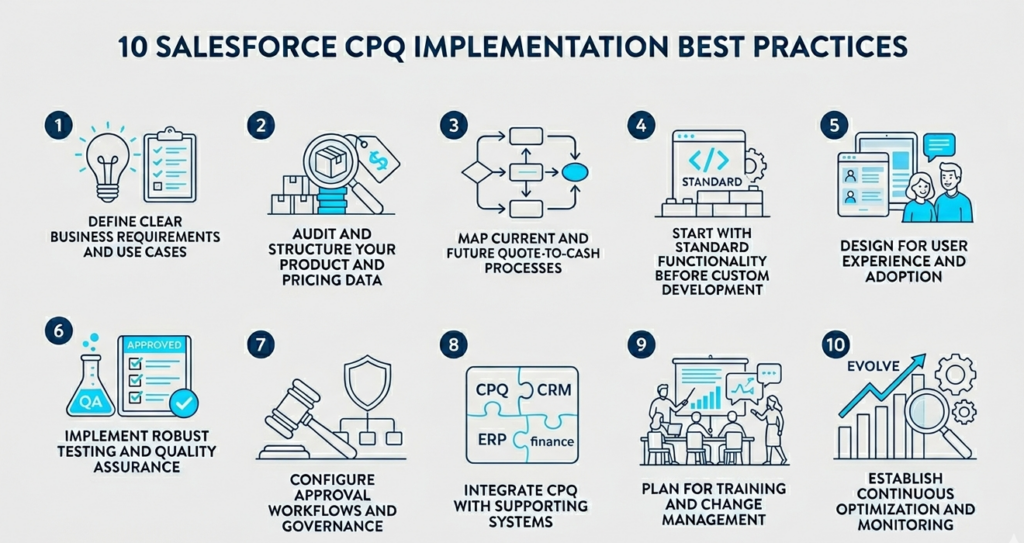
1. Define clear business requirements and use cases
The most expensive CPQ mistakes happen before anyone opens a sandbox. When requirements are vague or incomplete, every subsequent decision is made on a shaky foundation — and rework during testing costs far more than time spent upfront getting requirements right.
How to approach it
Begin with cross-functional workshops involving sales, finance, operations, and IT. The goal isn’t consensus on features, it’s clarity on pain points and measurable outcomes. Reduce average quote creation time from three days to one. Cut the discount approval cycle by 50%. Increase renewal attach rate by 15%. These are requirements. “Improve the quoting process” is not.
Once goals are set, translate them into measurable KPIs. This could be reducing average quote creation time from 3 days to 1 or cutting the discount approval cycle by 50%. Having exact metrics helps you keep the implementation grounded.
For document requirements, use structured user stories that define the actor, the action, and the outcome. For example: “As a Sales Manager, I want finance approval for any discount above 20% so that margins are protected.”
2. Audit and structure your product and pricing data
CPQ is only as reliable as the data behind it. Many implementations struggle because product and pricing information is scattered across spreadsheets, legacy systems, and internal knowledge that is not documented.
So, the first thing is to make it a priority to address this early. If catalog cleanup is delayed, your Salesforce CPQ implementation will slow down or go over budget. Moreover, poor data leads to incorrect quotes and low user trust in the system.
How to approach it
Start by bringing everything into one place. This includes products, bundles, add-ons, and configuration options. Our goal is to create a single and reliable master catalog. From there, start standardizing naming, SKUs, and descriptions.
It significantly improves usability by removing duplicate entries and outdated products. Also, review pricing structures. Discounts are rationalized so it’s clear which ones should be applied automatically and which ones require approval. This helps keep pricing consistent and easier to manage.
What to focus on during cleanup
- Product standardization
Align product names and codes, and remove redundancies so the catalog is easier to navigate and maintain - Pricing logic
Review your existing models such as block, ramp, or tiered pricing, and simplify them where possible to improve performance and reduce complexity - Attribute definition
Instead of creating too many SKUs, identify product attributes like size, region, or user count that can be handled through configuration. This keeps the catalog lean and flexible
Getting this foundation right makes everything else easier.
3. Map current and future quote‑to‑cash processes
Once the foundation is in place, let us focus on understanding how the quote-to-cash process works today. This means mapping the full journey from lead to invoice and renewal, including every handoff between sales, deal desk, legal, and finance. This step helps us see where delays, rework, or gaps exist.
How to approach it
Understanding how your quote-to-cash process actually works today is essential before designing what it should look like in CPQ. The gap between those two things is usually where the problems live.
Document the current process in detail, capturing every handoff between sales, deal desk, legal, and finance. Identify where quotes stall, where rework happens, and where data is re-entered manually. This isn’t an audit for its own sake — it’s the evidence base for your future-state design.
Another key area is defining how quotes turn into contracts and orders. Just make sure these transitions are clear, structured, and aligned with downstream systems. One thing to always emphasize is testing the full end-to-end process, not just quote creation. This includes approvals, order generation, billing handoffs, and renewals.
From there, design the CPQ-centred process with integration points defined: where does billing pick up from CPQ? How does ERP receive order data? Which steps are fully automated and which require human judgment, particularly for exceptions and approvals? Map how quotes become contracts and how contracts generate orders.
One thing we consistently emphasize to clients: test the full end-to-end process during UAT, not just quote creation. Approvals, order generation, billing handoffs, and renewal triggers all need to behave correctly before go-live. Teams that only validate the quoting step discover the gaps when they’re most expensive to fix.
4. Start with standard functionality before custom development
Salesforce CPQ already offers a strong set of features out of the box. In many cases, product rules, pricing rules, discount schedules, quote templates, and approval workflows are enough to handle most business scenarios. It has been found that the best results come from using these standard capabilities as much as possible before considering any custom development.
How to approach it
Always begin by solving problems through configuration rather than code. Declarative features are easier to manage, quicker to implement, and more stable over time. Custom scripts, plug-ins, or additional objects are only introduced when there is a clear and well-documented gap that cannot be handled through standard functionality.
Also be careful about building for rare exceptions. If a scenario only occurs a few times a year, it’s usually better to handle it manually or adjust the process slightly rather than adding complexity to the system. Over time, we’ve seen that too much customization leads to higher maintenance effort and makes upgrades more difficult.
5. Design for user experience and adoption
We’ve seen technically sound CPQ implementations fail within six months of go-live because the sales team didn’t use them. If CPQ feels slower or more cognitively demanding than the spreadsheet it replaced, reps will find workarounds — and leadership won’t find out until pipeline data starts looking wrong.
How to approach it
Focus on reducing effort for the end user. Fewer clicks, clearer steps, and less guesswork go a long way in driving adoption.
- Guided selling flows: Design simple, intuitive flows that guide reps toward the right products based on customer needs, instead of expecting them to remember every option
- Simplified layouts: Use dynamic page layouts so that only relevant fields are shown at each stage. This keeps the interface clean and avoids overwhelming users
- Professional quote templates: Create clear and well-structured quote documents that are easy for customers to understand. This removes the risk of inconsistent or poorly formatted manual quotes
As a suggestion, also involve your experienced sales reps early in the process. Their input helps you align the system with real-world workflows, not just theoretical ones. It also builds early trust, which makes adoption much smoother once the system goes live. In the end, if the system is easy to use and saves time, adoption follows naturally.
6. Implement robust testing and quality assurance
Testing is where most CPQ implementations cut corners and where the consequences are most visible after go-live. The typical pattern is to test the happy path (a clean, simple quote with no edge cases) and declare UAT complete. Then real users encounter bundles with complex dependencies, multi-year deals with mid-term amendments, and approval scenarios that weren’t in the test script.
How to approach it
You need to focus on building test scenarios that reflect actual business complexity, not just ideal flows.
- Use realistic test data: Create test quotes with bundles, discounts, partner pricing, and edge cases so the system is tested under real conditions
- Test the full lifecycle: Don’t stop at quote creation. Validate the entire flow from opportunity to quote, contract, order, invoice, and renewal
- Involve cross-functional teams: Sales, finance, and operations are all part of UAT. Each team tests what matters to them, with clear ownership
- Push edge cases deliberately: Include scenarios like extreme discounts, multi-year deals, or unusual combinations to expose gaps in logic early
Our goal during testing is simple. Trying to break the system before go-live. This is the stage where cpq requirements are put to the test, and fixing issues here is far easier than dealing with them in production.
7. Configure approval workflows and governance
One of the most common reasons organizations implement CPQ is to fix inconsistent discounting and slow approval cycles. But if you simply move the existing approval chain into CPQ without redesigning it, you’ve digitized the bottleneck without removing it.
How to approach it
Start by defining clear rules around discounts and margins. Instead of subjective decisions, approvals are triggered based on set thresholds. This brings consistency and reduces back-and-forth. Approvals are then assigned to roles rather than individuals. This avoids delays when someone is unavailable and keeps the process moving.
Where possible, also enable parallel approvals. For example, legal and finance can review a deal at the same time instead of waiting on each other. This helps shorten overall approval cycles. After go-live, continue to monitor how long approvals are taking. If certain steps are slowing things down, refine the rules to keep the process efficient.
The goal is to make approvals structured but not restrictive, so deals move faster without losing control.
8. Integrate CPQ with supporting systems
CPQ delivers the most value when it’s not working in isolation. Connecting it with ERP, billing, and other systems helps create a single source of truth and removes the need for manual re-entry.
Common integration points:
- Account/Customer Sync: Keep customer records consistent between Salesforce and ERP.
- Product/Inventory Sync: Give sales reps real‑time visibility into inventory and backorders.
- Opportunity‑to‑Order: Automatically generate ERP sales orders when opportunities close in Salesforce.
- Billing: Connect to Salesforce Billing for invoicing, tax, and revenue schedules.
- ERP (SAP, Oracle, NetSuite): Manage orders, inventory, and fulfillment.
- Contract Lifecycle Management (CLM): Use clause libraries and redlining tools.
- eSignature: Speed up contract execution.
Use platforms like MuleSoft or APIs to enable these connections and keep data moving smoothly across systems. Because, when done right, the impact is significant. Organizations can reduce quote-to-cash cycle time by up to 50% and bring down billing errors by as much as 90%.
9. Plan for training and change management
In many cases, even a well-designed CPQ system can fall short if users go back to familiar ways of working. Adoption depends on how comfortable teams feel using it in their day-to-day work.
How to approach it
- Role-based, hands-on training
Design separate training paths for sales reps, managers, and admins. Most sessions are done in a sandbox, so users can work through real deal scenarios without any risk - Focus on the “why”
Don’t just show how the system works. Explain the impact, such as less manual effort, faster approvals, and quicker deal cycles. This helps reduce resistance early on - Support beyond go-live
Identify internal champions who can guide teams on the ground, and keep collecting feedback to refine the system as usage grows
Treat change management as more than a technical step. Clear communication from leadership, along with visible benefits, plays a key role in driving adoption. When training is practical and the value is clear, teams are far more likely to use the system consistently and get the results it was designed for.
10. Establish continuous optimization and monitoring
Don’t treat Salesforce CPQ as something that goes live and then stays unchanged. In our experience, it needs regular attention to keep delivering value as the business evolves. Once the initial rollout is complete, focus on tracking key metrics to understand how well the system is performing and where improvements are needed.
What to monitor
- Quote turnaround time
The time it takes from the initial request to the final proposal - Average order value (AOV)
Whether guided selling and bundling are helping increase deal size through upsell and cross-sell - Win rates and renewals
How CPQ is contributing to revenue growth and customer retention over time - User adoption
The number of reps actively using the system versus those still relying on offline methods
Alongside these metrics, carry out your regular audits of system performance and data quality. As new products, pricing models, and processes are introduced, the CPQ setup needs to stay aligned.
5 Common Salesforce CPQ Implementation Mistakes (and How to Avoid Them)
Most CPQ challenges are not technical. They come from decisions made early in the project. Integrating Salesforce CPQ implementation best practices involves recognizing these challenges early. The good part is that these can be anticipated and managed with the right approach.
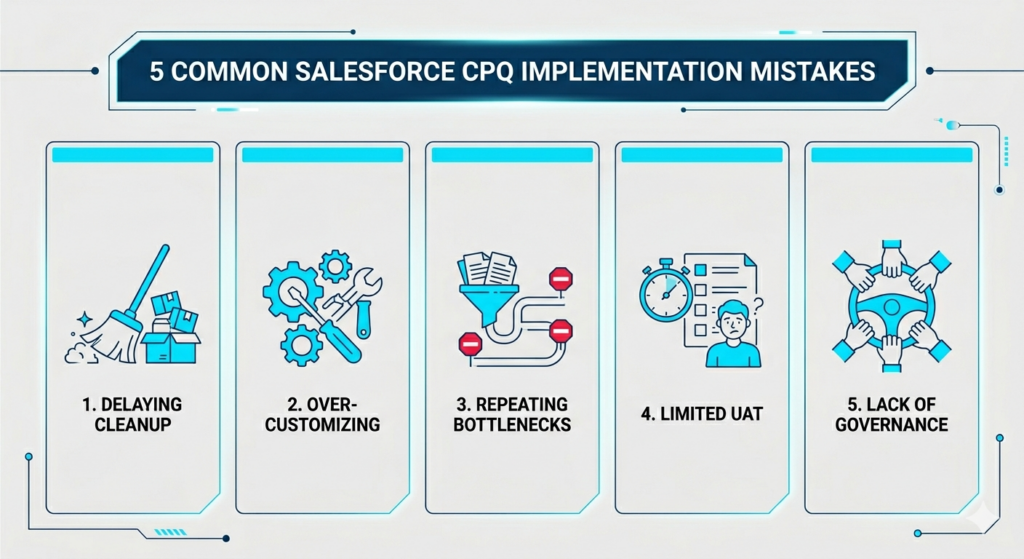
1. Delaying product and pricing cleanup
One of the most common scenarios is when teams move ahead with configuration while assuming data cleanup can happen later. In reality, this creates unstable foundations. If product and pricing data is inconsistent, the rules built on top of it won’t behave reliably.
Solution: You need to make data cleanup a prerequisite. No product enters the CPQ catalog until it has a standardized code, clear description, and validated pricing.
2. Over-customizing too early
There’s usually a push to replicate every detail of legacy systems using custom code. This usually leads to a setup that is hard to maintain and even harder to scale.
Solution: Follow a strict “standard first” approach. If something cannot be solved through native CPQ features, it goes through a proper review before any custom development is approved.
3. Approval workflows that repeat old bottlenecks
Simply moving existing approval chains into CPQ doesn’t fix the problem. It always recreates the same delays in a digital format.
Solution: Redesign approvals using parallel routing and smarter logic. For example, if a quote is resubmitted without changes to already approved sections, only the updated parts go through approval again.
4. Limited UAT and unrealistic testing
Testing focuses on simple scenarios, while real-world complexity is left out. This leads to issues once the system is live.
Solution: Build test cases based on actual past deals, especially the ones that were difficult to process. Also involve users from different regions and product lines to ensure broader coverage.
5. Lack of governance and ownership
Over time, without clear ownership, product catalogs and pricing rules tend to become inconsistent as different teams introduce changes.
Solution: Set up a CPQ governance model in the form of a Center of Excellence. This group includes stakeholders from sales, finance, and IT, and meets regularly to review performance, manage changes, and maintain data standards.
By addressing these challenges early, you will be able to keep Salesforce CPQ implementations stable, scalable, and aligned with long-term business needs.
Salesforce CPQ Implementation Roadmap: Phases, Timeline, and Deliverables
As you’re thinking about Salesforce CPQ implementation best practices, it helps to understand the shape of a typical implementation. The table below reflects realistic timelines from our project experience — not vendor marketing estimates.
| Implementation Phase | Key Deliverable | Duration (Typical) |
| Discovery | Requirement Traceability Matrix. | 2-4 Weeks. |
| Configuration | Validated Sandbox Environment. | 4-8 Weeks. |
| Testing | UAT Sign-off and Defect Log. | 2-3 Weeks. |
| Deployment | Production Go-Live. | 1 Week. |
Phase 1: Discovery and planning (Weeks 1–4)
This is where you set the foundation. Define your business goals, map current and future processes, and gather detailed requirements. The outcome is a prioritized list of use cases and a high-level solution design that guides the rest of the project.
Phase 2: Design and build (Weeks 5–10)
Here, you move into Salesforce CPQ configuration. The product catalog is built, pricing and product rules are set up, and quote templates are designed in a sandbox environment. If integrations are part of the scope, this is when you start connecting CPQ with ERP and finance systems.
Phase 3: Testing and refinement (Weeks 11–14)
This phase is focused on validation. Run detailed testing across scenarios, leading into UAT with business users. Feedback is incorporated, issues are fixed, and configurations are fine-tuned. Also, test data migration to ensure legacy contracts and records are brought in correctly.
Phase 4: Training and launch (Weeks 15–16)
You need to roll out role-based training across teams and prepare for go-live. In most cases, just start with a phased rollout, such as a pilot group or a specific product line, to manage risk and build confidence.
Phase 5: Post-launch support and hypercare (Week 17+)
After go-live, stay closely involved to resolve early issues quickly. This “hyper care” phase ensures a smooth transition. At the same time, begin tracking KPIs and move into continuous improvement based on real user feedback.
Work With a Salesforce CPQ Implementation Partner
If you’re looking to implement Salesforce CPQ and need guidance and support, then a dedicated Salesforce partner can help you accelerate this project.
We are a Salesforce consulting partner with more than 10 years of experience in digital connectivity, integration, and revenue operations.
If you’re exploring Salesforce CPQ integration or considering a platform assessment, we see this as the starting point for understanding what the journey really involves. It helps set expectations early, especially around where complexity tends to build and where teams typically face challenges.
We’ve built connected quote-to-cash environments for manufacturers, SaaS companies, and enterprise services organisations across North America and Europe. Our approach starts with structured discovery to establish clear requirements and a phased roadmap.
How Incepta support Salesforce CPQ implementations
- We start with structured discovery to define clear requirements, KPIs, and a phased roadmap aligned with best practices
- We clean and restructure product and pricing catalogs so the system is scalable and ready for automation from the start
- We design bundles, pricing logic, discount rules, and approval workflows that reflect real sales processes while staying as close to standard CPQ as possible
- We deliver integrations with billing and ERP systems, using our integration expertise and platforms like MuleSoft, so data flows smoothly from quote to order to invoice
- We set up governance, health checks, and continuous optimization to ensure the system evolves with new products, regions, and business models
In addition, through our AI Center of Excellence focused on Salesforce, we help extend CPQ capabilities with AI-driven insights, smarter approvals, and recommendations. Once the foundation is in place, this allows teams to move beyond automation toward more informed, data-driven decision-making across the quote-to-cash process.
If you’re evaluating a CPQ implementation or trying to stabilise an existing one, the right first step is a conversation about what’s actually involved. Reach out to start that conversation.
Final Thoughts
Salesforce CPQ can fundamentally improve the quote-to-cash process — but only when it’s built on a solid foundation. The technology is capable. What determines whether it delivers on that capability is the quality of the decisions made before and during implementation: clear requirements, clean data, deliberate governance, and a genuine focus on the people who will use it every day.
The 10 best practices in this guide aren’t theoretical. They come from the pattern of what works and what doesn’t across real implementations. Follow them, and CPQ becomes a reliable engine for revenue growth. Skip them, and CPQ becomes an expensive addition to a process that still runs on spreadsheets.
The choice is made early — which is exactly why it pays to get it right from the start.
FAQs
How long does a Salesforce CPQ implementation take?
For most mid‑market organizations, a focused implementation takes about 3–6 months from discovery to full rollout, depending on catalog complexity, approval design, and the depth of cpq salesforce integration with billing and ERP systems.
What are the essential requirements for CPQ implementation?
You need a clean product and pricing catalog, clearly defined approval policies, a target quote‑to‑cash process, and documented CPQ requirements for phase 1 use cases. You also need alignment between sales, finance, and IT on goals and KPIs
What should we do first: product catalog cleanup or process mapping?
In practice, you should do both in parallel but start with a light process map while you begin catalog cleanup. Most experts agree that ignoring catalog cleanup early is one of the fastest ways to derail Salesforce CPQ implementation later.
Do I need a consultant for CPQ implementation?
You can configure simple scenarios internally, but many companies bring in an experienced partner to avoid common mistakes, especially around complex bundles, subscriptions, and salesforce cpq integration with billing and ERP. A consultant who knows salesforce cpq implementation best practices can often reduce timeline and rework significantly.
What integrations are required for CPQ?
At minimum, you should integrate CPQ with Salesforce core (accounts, opportunities) and your billing or ERP system so orders and invoices flow automatically. Many customers also integrate CPQ with CLM, tax engines, and eSignature tools to fully automate quote‑to‑cash.