
The 30-Second Answer
In the Workato vs MuleSoft decision, MuleSoft is the right integration platform when you run big, complex systems. Think legacy apps, on-premises servers, and heavy data loads. It gives you deep control, but it needs a skilled team and a large budget. Workato is the right integration platform when speed matters most. It connects cloud apps fast, and business teams can help build.
We implement both platforms for a living. Our engineers ship production work on MuleSoft and Workato every week, so we have no platform to protect here. The honest MuleSoft vs Workato answer depends on six things: data volume, deployment needs, team skills, governance, B2B requirements, and your AI plans. This guide walks through each one. It also covers the cases where we tell clients not to buy MuleSoft at all.
Choose MuleSoft if you:
- Connect legacy, on-premises, or high-volume systems
- Need full API management and strict governance
- Have (or will fund) a dedicated integration team
Choose Workato if you:
- Mostly connect cloud apps to other cloud apps
- Want business teams to build automations too
- Need results in weeks, not months
What MuleSoft Anypoint Platform Is (and Isn’t)
MuleSoft Anypoint Platform is an enterprise integration platform built around APIs. An API is a doorway that lets one system share data with another. MuleSoft treats every integration as a reusable API, an approach called API-led connectivity. Each API you build gets stored in Anypoint Exchange, a shared library, and we see the reuse payoff on client projects all the time: every new API becomes a building block for the next project.
One thing trips people up in any MuleSoft vs Workato comparison. “MuleSoft” is really two products, and the reuse model works differently in each. Anypoint Platform is the main one, built for developers who manage the full API lifecycle, from design to API management to retirement. MuleSoft for Flow: Integration is a lighter tool for business users inside Salesforce. Most comparisons, including this one, are about Anypoint.
People also lump both platforms under the label iPaaS, which means integration platform as a service. The label hides a real difference in the app-connection problems we solve daily. MuleSoft started as an enterprise service bus, a system-to-system messaging layer for connecting applications inside one company. That heritage is why it handles old mainframes and on-premises databases so well.
MuleSoft deploys almost anywhere. Public cloud, private cloud, on-premises, or Kubernetes through Runtime Fabric. Salesforce has owned MuleSoft since 2018, and what CloudHub 2.0 changed about running Mule at scale shows the platform keeps evolving under that ownership.

What Workato Is (and Isn’t)
Workato is an automation platform that grew into an iPaaS. It started with task automation and expanded from there. You build “recipes,” which are simple trigger-and-action workflows. When a new hire appears in your HR system, a recipe can create their accounts and send a Slack alert.
We built exactly that flow for a public-sector client, and it checks for new hires every five minutes.
The integration platform is fast to learn and fast to ship, which is why “citizen integrators” love it. On G2’s head-to-head comparison, Workato scores 9.0 for ease of use against MuleSoft’s 8.7. It scores 9.3 for support quality against MuleSoft’s 8.2.
Those gaps match what our teams see when they run recipe projects next to Mule projects.
Workato claims more than 1,000 connectors. Read the fine print first. Many of those connectors are community-built, so they sit outside Workato’s own support agreements. The core connectors are solid. We used them to automate a full hiring workflow for an online bank, from interview scheduling to signed offer letters.
Workato is real enterprise software, not a toy, and its record growth backs that up. It goes past data sync into workflow logic, like routing a lead and waiting for a human approval. Its limits show up at scale, and we cover that below.
Workato vs MuleSoft: Head-to-Head Table
The table below sums up the Workato vs MuleSoft comparison in one place. We keep a running view of both platforms across our client base, and this reflects what we see in delivery, not vendor marketing.
| Criteria | MuleSoft | Workato |
| Core design | API-led enterprise integration, ESB roots | Recipe-based automation |
| Main builder | Integration developers | Citizen integrators plus IT |
| Connectors | Hundreds, vendor-managed | 1,000+, many community-built |
| API management | Full lifecycle, deep governance (G2:9.4 vs 8.7) | Basic; exposes automations as APIs |
| Workflow automation | Strong (G2:9.0) | Stronger (G2:9.7) |
| Deployment | Any cloud, on-prem, hybrid, Runtime Fabric (MuleSoft) | Public cloud or AWS VPC, with on-prem agents (MuleSoft’s claim) |
| Scale profile | High volume, low latency | Moderate volume; timeout and concurrency limits under heavy load (MuleSoft’s claim) |
| Pricing model | vCore capacity or consumption (Vendr) | Platform tier plus per-task pricing (Vendr) |
| Typical timeline | Months (Integrate.io cites 6–8; we see faster with the right scope) | Days to weeks for first recipes |
The Skills Question Nobody Prices In
Here is the cost that never shows up in a Workato vs MuleSoft vendor quote: people. Both platforms need skills that most IT teams do not have on day one. We staff these integration projects across North America, so we price this reality every week.
What MuleSoft demands of your team
MuleSoft needs developers who know DataWeave and Java. DataWeave is MuleSoft’s own language for transforming data, and it exists nowhere else. Specialized MuleSoft developers command $150,000 to $200,000 a year, per Integrate.io’s cost research. Our bench of 40+ certified developers exists because most clients cannot hire that skill fast enough on their own.
Plan for at least two dedicated developers plus an architect for a serious Mule estate. Anything less, and the platform runs you instead of the other way around. The pet retailer migration we delivered moved 70+ APIs across AWS and Azure with zero downtime, and that took disciplined, senior hands.
What Workato demands of your team
Workato markets itself as no-code, and the citizen integrator model holds for standard patterns. Then your logic gets complex, and builders land in Formula Mode, which is Ruby scripting in disguise. We hit the same wall on recipes that needed custom connectors. If only one person on your team knows Ruby, you now own automations only one person can fix.
The fix is simple governance. Give every business-built recipe a technical owner, the way DataWeave code gets owners on the Mule side, and manage versions properly. We use recipe lifecycle management for exactly this reason: it moves recipes through dev, test, and production like real software.
Pricing and Total Cost of Ownership
Neither vendor publishes list prices, so total cost of ownership (TCO) is where the MuleSoft vs Workato debate gets murky. Here is what market data shows, plus what we see in deals. The license waste we routinely find in platform reviews tells us most buyers overpay before they optimize.
MuleSoft pricing. Licensing is based on vCores, which are units of reserved computing power, and runtime choices drive that infrastructure spend. Procurement data from Vendr shows a median annual contract of $69,290 across 67 verified purchases, with deals running from $9,828 to $258,636 and enterprise deployments reaching $250,000 to $600,000+. First-year TCO often reaches 2 to 3 times the subscription once you add implementation, training, and staff.
Workato pricing. You pay a platform tier fee plus usage, and our engineers watch these meters in production. Vendr’s deal data puts contracts at $25,000 to $500,000+ a year, with small and mid-market deployments landing around $30,000 to $80,000. The catch is the usage meter. Every recipe run burns tasks, so costs climb as adoption grows, and overage charges apply once consumption passes your allowance.
The two pricing models fail in different ways, so TCO planning matters more than the sticker. With vCores, you pay for capacity even when it sits idle. With tasks, success creates surprise overages. Budget for the failure mode that fits your usage pattern, and get a structured review of your current platform spend before you sign either contract.
One timeline note on TCO. Integrate.io claims MuleSoft implementations take 6 to 8 months. That is a vendor with an alternative to sell, and it does not match our delivery data. Scope, data quality, and team readiness drive the timeline far more than the integration platform does. A batch job we rebuilt on Mule cut a three-hour nightly process to under one hour, and the build took weeks, not quarters.
How to Decide: Six Evaluation Criteria
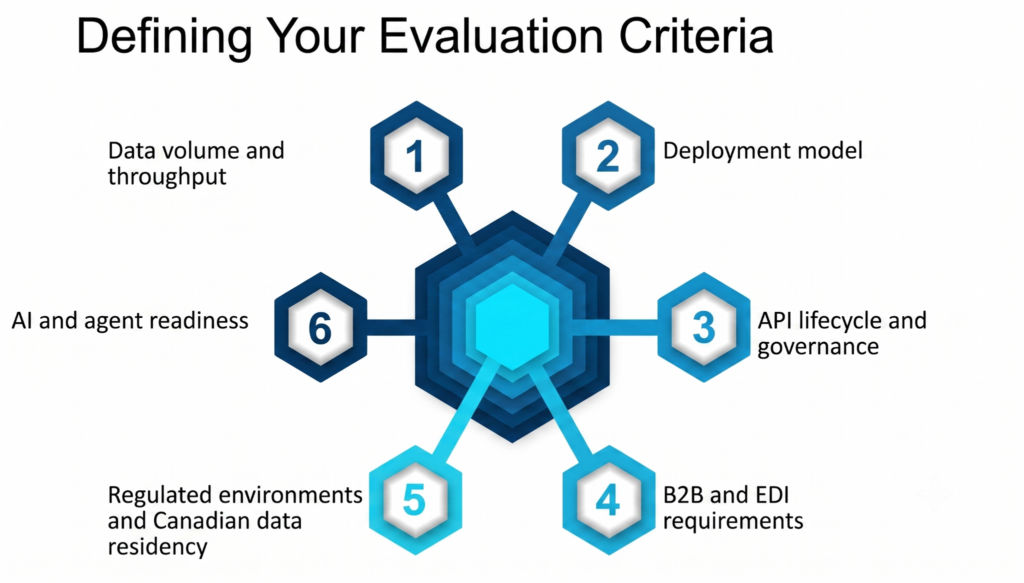
Use these six tests to settle the Workato vs MuleSoft question for your own estate. Score your organization against each one, and the answer usually becomes obvious. The same scorecard style runs through our platform reviews before any recommendation.
1. Data volume and throughput
MuleSoft is built for high volume and low latency, handling both real-time and batch work, per its platform page. Workato handles moderate loads well but hits timeout and concurrency limits under heavy, high-frequency work. MuleSoft makes that claim loudly, and our delivery experience backs the direction. It is the kind of pressure a 70-API retail estate puts on any integration platform every day.
Our rule of thumb: if you move millions of records on a schedule, or you cannot tolerate seconds of delay, lean towards MuleSoft. The JD Edwards batch project we delivered is the kind of workload where recipes would struggle.
2. Deployment model
MuleSoft runs on any major cloud, in private clouds, on your own servers, or in containers through Runtime Fabric, per its platform page. Workato is cloud-native, deploying to public cloud or AWS VPC, with on-premises agents as a bridge. If your systems must stay inside your own walls, this criterion alone decides it. Our CloudHub 2.0 migration work covers what modern Mule hosting looks like when cloud is on the table.
3. API lifecycle and governance
If your strategy is to publish APIs as products, with versioning, policies, and a developer portal, MuleSoft is the stronger tool for API management. G2 users score it 9.4 against Workato’s 8.7 on that front, and API-led design keeps every service governed from birth. Governance is also a security question: unmanaged “zombie” APIs are open doors, and we audit estates against the OWASP API Top 10 to find them.
4. B2B and EDI requirements
EDI is the electronic document standard that big retailers, banks, and logistics partners still require. MuleSoft offers native EDI and partner management, while Workato covers EDI through a third-party partnership. That is a vendor claim, but it matches our field experience. If trading partners are core to your business, weigh this heavily, and ask our enterprise integration team how EDI shapes the architecture.
5. Regulated environments and Canadian data residency
Both platforms carry strong compliance credentials. Workato lists SOC 1 and 2 Type II, ISO 27001 and 27701, HIPAA, PCI-DSS Level 1, and GDPR coverage, per its security documentation. MuleSoft points to HIPAA and GDPR alignment plus central policy control, per its platform page, and we validate that alignment against DORA, GDPR, PCI-DSS, and the OWASP API Top 10 in security audits.
Canadian banks and telecoms add one more test: where the data lives and who controls the runtime. Hybrid and on-premises options matter more here than in most markets. A North American retail estate we ran across AWS and Azure taught us to settle residency and runtime control before any platform debate, because they narrow the field fast.
6. AI and agent readiness
AI agents are software workers that act on their own, and they are only as good as the data they can reach. Agents fail without live, governed access to your systems, so your integration platform is now part of your AI plan.
MuleSoft claims Agentforce connects 85% faster through MuleSoft than through Workato. Treat that number as marketing, but the direction is fair: MuleSoft is native to the Salesforce stack. Its Agent Fabric adds an agent registry, MCP support, and gateways for agent traffic, and our four-step checklist for making APIs agent-ready covers the setup.
Workato is not standing still. Its Enterprise MCP push is central to the growth story and it fits teams building agent workflows across many SaaS tools. Salesforce, meanwhile, keeps buying: the Informatica close and three agentic acquisitions show where MuleSoft’s roadmap gravity points. Either way, the integration layer is the control plane for enterprise AI, whichever platform you pick.
When We Tell Clients Not to Buy MuleSoft — and When the Answer Is Both
Our MuleSoft disqualification list
We are a MuleSoft Premier Partner, and we still turn clients away from the platform. Our delivery practice applies four tests, and failing any one of them tilts the MuleSoft vs Workato call the other way:
- Your estate is all cloud SaaS. No mainframes, no on-premises databases, no EDI. Mule’s biggest strengths sit unused.
- You have no integration team and no plan to fund one. The platform will stall without dedicated, trained owners.
- Your use cases are workflow automation at moderate volume. Lead routing and onboarding flows are recipe territory.
- Your all-in budget is under six figures. License plus delivery plus staff cannot produce a return at that level.
Hit two or more of those, and Workato or a lighter tool serves you better. We would rather say that on day one than bill you for an integration platform that fights your reality. The onboarding automation we built for a public-sector client is proof that the smaller tool is often the right tool.
The coexistence pattern
Here is what no vendor comparison tells you: many enterprises should run both. MuleSoft handles the system-of-record APIs, the EDI, and the heavy hybrid connections. Workato handles the department-level automation on top. How Agentforce and MuleSoft work together on agent behaviour shows the layered thinking, and the same logic applies to pairing Mule with Workato.
The pattern works when one team governs both. Shared standards for security, naming, and error handling keep the two platforms from drifting into chaos. Our engineers run this dual-platform setup in production today, and a full coexistence architecture guide is coming next in this series.

Get a Straight Answer on Platform Fit
You now have the framework for the Workato vs MuleSoft decision. If you want a second set of eyes, we offer a free integration platform fit assessment. It reviews your estate against the six criteria above, including whether your APIs are ready for AI agents, and gives you a short written readout with no sales deck attached.
- High-volume, legacy, or EDI-heavy estate: start with our MuleSoft delivery team
- Already on Mule and questioning cost or performance: book a platform assessment
- Cloud-first estate leaning toward recipes: see our Workato delivery work
We have spent 10+ years on enterprise integration for banks, telecoms, and retailers. We will tell you which platform fits, even when the answer is not the one we are best known for. And if your roadmap includes AI agents, start with how integration shapes agent behaviour in production, because that decision follows this one.
Frequently Asked Questions
Is MuleSoft better than Workato?
Neither wins the MuleSoft vs Workato question across the board. MuleSoft is better for API-led enterprise integration, legacy systems, high volume, and strict governance. Workato is better for fast cloud automation that business teams help build. How we frame the platform decision in the integration layer comes down to the six criteria above.
Why is MuleSoft so expensive?
MuleSoft pricing reflects reserved capacity, DataWeave-skilled people, and real delivery work. The median contract runs $69,290 a year, and enterprise deals reach $250,000 to $600,000+, per Vendr purchase data, before staff costs. TCO often reaches 2 to 3 times the subscription in year one. API-led reuse through Anypoint Exchange pays that back only at enterprise scale.
Can Workato replace MuleSoft?
Workato can replace MuleSoft when your estate is cloud SaaS and your volumes are moderate. It cannot match MuleSoft on native EDI, on-premises deployment, or full API management, and that level of deployment control is rare among integration platforms, per Truto’s compliance review. Migration in either direction is real engineering work, so scope it with a full estate audit before committing.
How do Workato and MuleSoft compare to Boomi?
Boomi sits between the two in a Workato vs MuleSoft vs Boomi comparison. It is a cloud-native integration platform with strong data integration, and its pay-as-you-go option runs $0.05 per message, per CheckThat’s pricing research. It is more IT-centric than Workato and lighter than MuleSoft. Our take on layering these platforms applies to Boomi too.
Which platform is better for Salesforce and Agentforce shops?
MuleSoft has the inside track in Salesforce environments. Salesforce owns it, and Agent Fabric ties into Agentforce directly, per MuleSoft. Workato still fits for automation around the edges of a Salesforce core. Our Salesforce platform review checks Agentforce readiness, including the enterprise integration layer behind it.
Can business users build on MuleSoft?
Business users can build simple flows with MuleSoft for Flow: Integration inside Salesforce. Anypoint Platform, the product in this comparison, is developer territory that expects DataWeave and Java skills. Workato gives citizen integrators far more room, with IT guardrails. The hiring workflow an online bank ran on recipes shows what that looks like.
What team do we need to run each platform?
For MuleSoft, plan on at least two certified developers plus an architect, backed by training or partner support to close DataWeave skill gaps. For Workato, plan on business builders plus one technical owner who handles Formula Mode logic and recipe version control. Neither integration platform runs itself.
Do these platforms meet Canadian data residency rules?
Both can meet Canadian data residency rules, but the paths differ. MuleSoft supports on-premises and private cloud runtimes you fully control. Workato offers regional data centers and control over data storage location within its cloud model, per its security page. Your regulator and your data classification decide which path works, and our platform assessment maps runtime topology against those rules.