

Financial Services Cloud (FSC) rewards firms that plan the data model and the integration layer first. This guide walks the full implementation from readiness to go-live, with the parts most guides skip: connecting core banking systems, moving off an existing org, and meeting Canadian regulatory expectations.
- FSC is an industry layer built on Sales Cloud and Service Cloud, not a separate CRM you build from scratch.
- A full build usually runs four to eight months. Lighter scopes take weeks.
- The Person Account data model is the biggest technical decision and the most common source of delay.
- Integration to core banking and a clean migration path decide whether the project succeeds.
Salesforce Financial Services Cloud gives banks, wealth managers, and insurers one view of each client across accounts, households, and interactions. The list price starts near $325 per user per month for the Enterprise edition, and implementation cost sits on top of that.
Most of the risk is not the license. It is the data model, the migration, and the systems FSC has to talk to. Our Salesforce consulting team sees the same pattern across banking projects: firms that architect integration early ship faster and spend less fixing things later.
What FSC Actually Is (and What It Isn’t)
Financial Services Cloud is an industry version of Salesforce built on top of Sales Cloud and Service Cloud. It adds a financial data model, relationship tools, and compliance features for banking, wealth and asset management, and insurance. It is not a fresh CRM you install in place of what you already run.
This distinction matters for budgeting and scope. If you already own Sales Cloud or Service Cloud, you extend into FSC rather than rebuilding your customer relationship management platform from zero. That single fact changes the timeline and the cost of most projects.
There is a second point of confusion worth clearing up. “Salesforce for financial services” is the wider portfolio, which can include Marketing Cloud, Data Cloud, Agentforce, and MuleSoft. FSC is the specific core product inside it. This guide covers FSC, but you should plan it as one piece of a broader digital transformation program, not a standalone tool.
Compared with plain Sales Cloud, FSC ships purpose-built tools that firms would otherwise build by hand. Salesforce Ben notes that FSC gives financial teams industry features out of the box that Sales Cloud only reaches through heavy customization.
| Dimension | Sales Cloud | Financial Services Cloud |
| Built for | Any sales team | Banking, wealth, insurance |
| Client model | Contacts and accounts | Person Accounts and households |
| Financial data | Not native | Financial accounts, holdings, roll-ups |
| Compliance | Generic, custom-built | Audit trails, industry tooling |
The FSC Data Model, Decoded
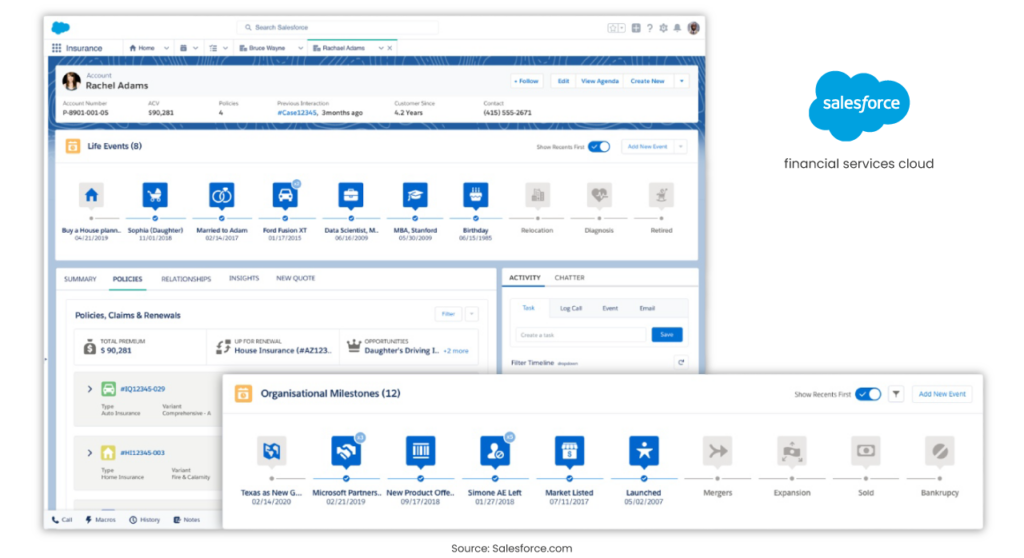
The data model is what makes FSC different, and it is where implementation complexity starts. Get it right on paper before you touch configuration. On past bank projects, mapping the model carefully up front is what keeps early decisions from becoming expensive to reverse later.
FSC uses Person Accounts for individual clients. A Person Account merges the Account and Contact into one record, which suits retail banking and wealth clients. For institutional and business relationships, FSC keeps the standard Business Account plus Contacts structure. You will use both.
On top of that sit the relationship features. Households group families or related entities so an advisor sees the full picture. The Actionable Relationship Center (ARC) maps those connections visually. Action Plans turn repeatable work like onboarding or know your customer (KYC) checks into task templates. Roll-up summaries total assets under management (AUM), loan balances, and coverage across a household.
| FSC object | What it holds | Why it matters |
| Person Account | Individual client record | Core unit for retail and wealth |
| Household | Grouped relationships | Full view of a client’s circle |
| Financial Account | Balances, holdings, policies | The financial data Sales Cloud lacks |
| Action Plan | Task templates | Consistent onboarding and compliance |
| Roll-up summary | Totals across a household | AUM and exposure at a glance |
One warning shapes the whole project. Enabling Person Accounts is permanent and it reshapes reporting, sharing, and integrations. Vantage Point recommends you budget about 20 percent of your timeline for Person Account planning and testing alone. Treat that as a floor, not a target.
Before You Install: Readiness, Scope, and the Org Decision
Planning is where most projects are won or lost. GetGenerative cites industry data that 30 to 70 percent of CRM projects fail, usually from weak planning or unclear business goals. Start by naming the outcome you want and the numbers you will track.
Secure an executive sponsor and a small governance group. Pull in business heads, information technology leaders, risk and compliance officers, and front-line advisors. This group owns alignment and keeps the project from drifting. Before you commit, run a readiness check on your current systems, and treat a structured platform assessment as the way to surface risk before it becomes rework.
Then make the org decision. You either install FSC in your existing Salesforce org or stand up a new one. The trade-off is real, and the wrong choice is costly.
| Option | Pros | Cons |
| Install in existing org | Reuses data and config | Higher risk of conflicts |
| New org | Clean slate, clean config | Full data migration needed |
Phase the rollout in three to six month blocks. Start with one business line or one core function, prove value, then expand. A phased plan de-risks the build and gives you early wins to fund the next stage. If your existing org carries years of buildup, an honest audit of that sprawl should come before any new construction.
The Implementation Phases
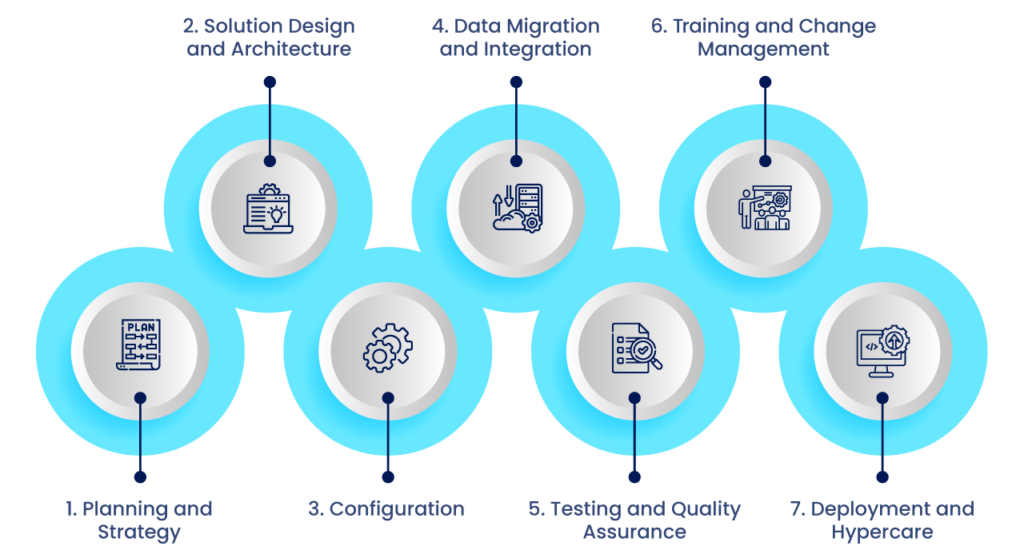
Financial Services Cloud implementation runs in seven phases. The order matters, and each phase feeds the next. Your overall implementation timeline depends on scope, but the sequence stays the same.
1. Planning and Strategy
Turn business goals into tracked measures. Set targets like faster onboarding, higher retention, or better first-call resolution. Assign an owner to each measure so results are visible after launch. Recognition like our Salesforce Partner Innovation Award comes from projects that start with this discipline, not from tooling alone.
2. Solution Design and Architecture
Run workshops with real users to capture workflows, compliance steps, and reporting needs. Sketch where Action Plans will drive onboarding and review work, since design choices here shape the whole implementation. Map your existing fields to standard FSC objects. Design the security model now: profiles, permission set groups, sharing rules, and encryption for sensitive data. Plan the reports and dashboards you will need, such as advisor pipeline and household AUM.
3. Configuration
Configure to the design, not by feel. FSC leans on permission set groups rather than profiles alone. Build Lightning pages with the client snapshot, financial account summary, and ARC. Enable Action Plans, householding, and roll-up summaries. Use Flow for automation, and keep custom code for the cases automation cannot handle.
A currency note here saves you confusion. Older guides frame FSC install around “Vlocity Insurance.” Vlocity is now packaged as OmniStudio, and it is not required for most banking and wealth deployments. It mainly matters for insurance and configure-price-quote use cases. Do not install it by default.
4. Data Migration and Integration
Decide what moves: clients, households, financial accounts, referrals, and service history. Use Data Loader for small volumes. For large or ongoing loads, plan real integration. This is where an API-led approach to unifying siloed banking data does the heavy lifting, and it is the part generic guides skip.
Map legacy fields to FSC objects, clean duplicates, and standardize formats before you load. Set a cut-over point, freeze the old system, run a delta load, then validate record counts.
5. Testing and Quality Assurance
Test in layers. Unit test each flow, permission set, and record type. Run system integration testing (SIT) across full workflows, such as a referral moving to a loan origination system (LOS) and back. Then run user acceptance testing (UAT) with real advisors on real scripts. Aim for high code coverage on any custom logic.
6. Training and Change Management
Build role-based training for bankers, advisors, operations, and compliance. Tie each feature to a benefit the user feels, like one screen instead of five. Use short guides for the top ten tasks and in-app prompts for the rest. Adoption is a project, not an afterthought.
7. Deployment and Hypercare
Run a go-live checklist: final deployment, integrations live, licenses and permission sets assigned, and a last data validation. Hold daily standups for the first two weeks. Track logins, records created, and Action Plan usage. Then form a Center of Excellence (CoE) to own continuous improvement.

Migrating From Existing Sales or Service Cloud to FSC
Many firms already run Sales Cloud or Service Cloud and assume moving to FSC means starting over. It does not. Silverline confirms that existing customers can move to FSC without a ground-up re-implementation. That reframes the whole project.
The catch is the data model. Person Account conversion and data restructuring add real effort. Vantage Point puts the migration at four to eight months and 30 to 50 percent more than a fresh FSC build. Plan for it rather than discovering it mid-project. When patching a legacy org costs more than replatforming, a clear-eyed assessment tells you which path wins.
Consolidation is the hidden prize. Redress Compliance reports a Canadian financial institution that consolidated roughly 800 Service Cloud and 150 FSC seats down to 280 FSC seats and cut around $180,000 in annual cost. We see the same pattern in CRM consolidation projects that replace legacy systems, where cleanup pays for a large share of the migration.
What It Costs and How Long It Takes?
Price FSC by the edition, not by a single headline number. Salesforce sells FSC in multiple editions, and TrustRadius lists a range from about $300 to $700 per user per month across four tiers. The Enterprise edition starts near $325 per user per month, and implementation is a separate line item.
The premium over Sales Cloud is where budgets get set. Vantage Point puts Sales Cloud Enterprise near $175 per user per month, a roughly $150 per user monthly gap that reaches about $180,000 a year at 100 users. Implementation cost sits on top of licenses and depends on scope.
Timeline follows scope. Improvado notes that FSC builds take weeks, not days, while full enterprise builds run four to eight months. On return, GetGenerative cites Nucleus Research finding that Trilogy Financial reached 147 percent return in the first year. Treat those figures as industry evidence, not a promise for your firm.
| Item | Sales Cloud | Financial Services Cloud |
| Starting list price | ~$175/user/mo | ~$325/user/mo |
| Typical build time | 2 to 4 months | 4 to 8 months |
| Best fit | General sales teams | Banks, wealth, insurance |
Integrating FSC With Your Core Systems
This is the section most guides treat as a footnote, and it is the part that decides success. FSC only delivers a single client view when it connects to the systems that hold the data. Salesforce itself points buyers to MuleSoft and integration partners for connecting on-premises and outside systems. Making that connection real is the connected-systems problem we solve every day.
Map the connections early. Core banking holds balances and transactions. Loan origination systems track applications. Portfolio and custodian systems hold investments. KYC and anti-money-laundering (AML) tools verify identity. Decide which flows run in real time through secure application programming interfaces (APIs) and which run as nightly batch syncs. Our work modernizing legacy payment rails with APIs shows how that split plays out for financial institutions.
Integration depth is not theory. On one bank project, our team mapped over 200 fields across eight enterprise systems to make one process work end to end. The same architecture behind a real-time loyalty rollout applies to FSC: unify the data first, then the client view becomes real.
| System | Sync pattern | Typical approach |
| Core banking | Real time and batch | API-led integration |
| Loan origination | Real time | Event-driven API |
| Custodian and portfolio | Batch | Nightly sync |
| KYC and AML | Real time | Secure API call |

Compliance and Data Residency for Canadian Institutions
Canadian financial institutions carry requirements that United States guides ignore. FSC ships the base tools: encryption for sensitive data, audit trails, and field history for reviews. The work is mapping those tools to Canadian rules, and that is where our secure, enterprise-grade delivery starts.
Plan your FSC configuration around the regulators you answer to. The Office of the Superintendent of Financial Institutions (OSFI) sets expectations for federally regulated institutions. The Proceeds of Crime (Money Laundering) and Terrorist Financing Act (PCMLTFA), administered by FINTRAC, shapes your KYC and AML setup. Quebec’s Law 25 adds privacy obligations for personal data. Data residency should be settled before go-live, not after.
Security at the integration layer needs the same care as the platform. Every API that carries regulated client data widens your exposure, so hardening the connection layer belongs in the compliance plan, not outside it.
After Go-Live: Adoption and the Data Cloud and Agentforce Path
Go-live is the start, not the finish. Watch adoption in the first weeks and fix friction fast. Then look at what FSC makes possible next. The strongest guides stop at deployment. The value keeps going.
FSC is the foundation for Salesforce’s AI agents. Vantage Point notes that FSC data feeds agents like the Financial Advisor and Banking Service assistants that run natively on the model. Those agents are only as good as the data beneath them, which is why a first production agent in four weeks depends on Data Cloud setup and clean records.
The connective tissue is integration again. Agents need to reach across your systems to answer well, and Agentforce paired with MuleSoft is how they reach core banking, portfolios, and third-party platforms securely.

Talk Through Your FSC Roadmap
Financial Services Cloud succeeds on the parts most teams underestimate: the data model, the migration, and the systems FSC connects to. That is exactly where our strengths sit.
- Siloed core banking data: our MuleSoft-certified team unifies it through API-led integration.
- Years of org buildup: our Salesforce platform assessment finds the risk before you build.
- Canadian financial services context: local delivery experience with banks and fintechs.
Ready to scope your build? Start a conversation with our Salesforce team.
Frequently Asked Questions
How long does an FSC implementation take?
Financial Services Cloud implementation timelines depend on scope. A light build takes weeks. A full enterprise build with data migration and integration usually runs four to eight months. Data migration complexity and the number of Salesforce clouds involved drive the difference. A readiness assessment sharpens the estimate.
How much does FSC cost per user?
Financial Services Cloud starts near $325 per user per month for the Enterprise edition, and editions range up to about $700. Implementation cost is separate from licenses and depends on scope. Our Salesforce team can help size the full number.
Is FSC different from Sales Cloud?
Yes. Financial Services Cloud is built on top of Sales Cloud and adds a financial data model, households, and compliance tooling. Sales Cloud is a general CRM. FSC extends it for financial services, which is why existing customers extend rather than rebuild.
Do we need Vlocity or OmniStudio for FSC?
No, not for most banking and wealth deployments. Vlocity is now OmniStudio, and it mainly serves insurance and configure-price-quote use cases. Standard FSC for banking and wealth does not require it. Confirm scope during an early readiness review.
Can we move to FSC without re-implementing our org?
Yes. Existing Sales Cloud and Service Cloud customers can extend into FSC rather than starting over, though Person Account conversion adds effort. A migration path preserves your existing data and customizations where it makes sense.
What is the hardest part of an FSC migration?
The Person Account data model. Enabling it is permanent and it reshapes reporting, sharing, and integrations. Plan and test it carefully, since a disciplined approach to integrating across systems reduces the risk to connected systems during the switch.
How does FSC connect to our core banking system?
Through integration. Salesforce points to MuleSoft and integration partners for connecting core banking and outside systems, using real-time APIs and batch syncs. Our payment modernization work shows the pattern for financial institutions.
Does FSC support Canadian compliance requirements?
FSC provides encryption, audit trails, and field history that support compliance. Canadian institutions still configure the platform to meet OSFI expectations, PCMLTFA and FINTRAC rules, and Quebec’s Law 25. Involve compliance during design, backed by our broader enterprise delivery experience.