

Salesforce serves as the system of record for over 150,000 companies, but no Salesforce org runs alone. The average enterprise connects Salesforce to more than 1,000 applications across ERP, marketing automation, data warehousing, and legacy back-office systems. Each Salesforce api integration carries its own data model, auth protocol, and failure mode.
The technology decision for Salesforce integration consultants has moved past point-to-point connectors. Modern Salesforce integration consulting spans API-led connectivity, iPaaS orchestration, and real-time event streaming. As of 2026, it also covers agentic integration through MuleSoft Agent Fabric and the Model Context Protocol (MCP).
Hiring the wrong Salesforce integration partner carries compounding costs. A poorly built Salesforce API integration layer creates data silos and breaks downstream automations. In the worst cases, it forces a full re-platform within 18 to 24 months.
Below: what to look for, what to ask, and what to avoid when choosing a Salesforce integration consultant.
What a Salesforce Integration Consultant Actually Does
A Salesforce integration consultant designs, builds, and maintains the data flows between Salesforce and every other system your company depends on. That goes far beyond writing API calls. It means mapping business processes across systems, defining data ownership, and setting up error handling. It also means building monitoring layers that catch failures before they reach end users.
A qualified Salesforce system integrator translates business requirements into an integration architecture:
- Should a data flow run in real time or batch?
- Should the pattern use request-reply or event-driven messaging?
- Which middleware or iPaaS platform fits the enterprise’s technical and budget constraints?
The consultant makes these calls.
Modern Salesforce integration services also cover data migration from legacy systems and identity matching across customer records. Increasingly, the scope includes enabling AI agents to access non-Salesforce data through MuleSoft Agent Fabric’s MCP and A2A connectors.
Failed integrations account for a large share of Salesforce project overruns. Choosing the right Salesforce integration consultant is one of the highest-stakes decisions you will make.
Multi-Cloud Salesforce Expertise
Salesforce is not a single product. An enterprise running Sales Cloud, Service Cloud, Marketing Cloud, Commerce Cloud, and Data Cloud at the same time faces five distinct data models and API conventions. Each cloud has its own integration patterns — all under the same platform family.
A consultant who only knows Sales Cloud will build integrations that break when data crosses into Marketing Cloud’s journey builder or Commerce Cloud’s order layer. Cross-cloud fluency is a baseline, not a bonus.
Data Cloud (now rebranded as Data 360) serves as the unification layer that feeds both analytics and Agentforce AI agents. The integration partner must know how to ingest, harmonize, and surface data through Data Cloud’s unified profiles. Integration quality directly shapes AI agent accuracy.
Test for this: ask the consultant to describe a project where they integrated data flows across three or more Salesforce clouds. If the answer defaults to Sales Cloud alone, the firm’s cross-cloud capability likely falls short.
Integration Architecture Knowledge
Point-to-Point vs Middleware vs iPaaS
The setup a Salesforce integration consultant recommends tells you a lot about their depth. Point-to-point links — direct connections between two systems — work for simple, low-volume use cases but collapse at scale.
With five connected systems, point-to-point creates 10 unique connections. At ten systems, that number hits 45 connections, each needing its own upkeep, error handling, and monitoring. This does not scale for any enterprise running more than a handful of Salesforce api integration workloads.
Middleware and iPaaS platforms solve this by putting integration logic in one place. A good Salesforce integration consultant should explain when to use middleware (for complex, high-volume workloads) versus iPaaS (for cloud-native, API-first setups). They should not default to one approach for every project.
The choice between platforms matters less than the design principles behind them: reuse, composability, and separation of concerns.
API-Led Connectivity
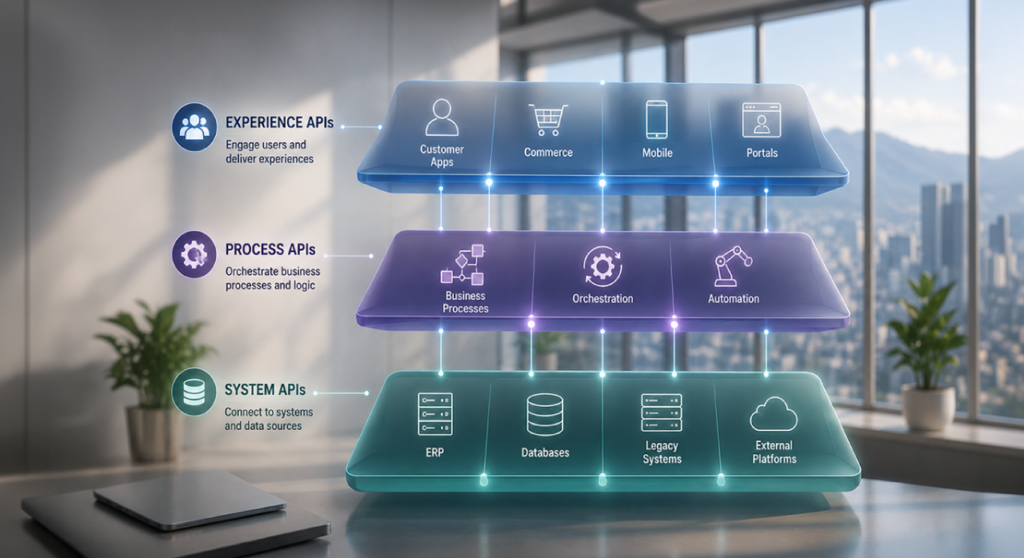
API-led connectivity — the three-layer architecture of System APIs, Process APIs, and Experience APIs — has become the standard for enterprise Salesforce api integration. MuleSoft built this framework, and it now guides integration design across the Salesforce ecosystem.
A partner needs to explain how System APIs expose raw data from back-end systems. They should cover how Process APIs handle business logic and how Experience APIs serve tailored data to front-end consumers. If they cannot, they are operating below the architectural standard the platform demands.
For teams already running MuleSoft, the consultant should know Anypoint Platform and API Manager. For on-premise workloads, ask about Runtime Fabric or CloudHub 2.0.
Multi-iPaaS Capability
Most Salesforce consulting partners have built their practices around a single iPaaS. But enterprises rarely operate in single-vendor environments, and different Salesforce api integration challenges call for different tools.
A consultant with multi-iPaaS capability can recommend the right platform for each use case instead of defaulting to the only tool they know. This separates a platform-agnostic advisor from a reseller with one hammer.
Four major iPaaS platforms a Salesforce system integrator should evaluate:
| Platform | Best Fit | Connector Library | Architecture | Key Strength |
|---|---|---|---|---|
| MuleSoft | Complex enterprise, API-led | 400+ pre-built | API-led three-layer | Full lifecycle API management |
| Boomi | Mid-market, hybrid cloud | 1,500+ connectors | Atom-based hybrid | Low-code visual design, hybrid deployment |
| Workato | Business-user automation | 1,000+ connectors | Recipe-based low-code | Business-IT collaboration |
| SnapLogic | AI-powered data pipelines | 500+ Snaps | Pipeline-based | AI-assisted integration design |
Incepta Solutions holds certified partnerships with all four. This lets the firm recommend and implement the right iPaaS for each client’s specific challenge instead of forcing every workload through a single vendor.
If you are unsure which platform fits, a platform assessment is the most direct starting point. It maps your existing integrations, finds gaps, and recommends the platform (or combination) that aligns with your architecture, budget, and team skills.
Data Cloud and Agentforce Readiness
Salesforce’s Agentforce platform runs on the Atlas Reasoning Engine. Its AI agents depend on the quality of data flowing into Data Cloud. Every integration consultant you evaluate should design with Agentforce readiness in mind.
Data Cloud unifies customer profiles across every connected system. It resolves duplicates, matches identities, and builds the single customer view that AI agents rely on when answering questions or kicking off workflows.
But agents that need data beyond Salesforce — such as SAP inventory levels, legacy ERP order status, and third-party logistics tracking — require MuleSoft Agent Fabric. The MCP Connector turns outside APIs into agent-ready tools. The A2A Connector lets agents on different platforms talk to each other.
A Salesforce integration partner who also knows MuleSoft’s Agent Fabric sets you up for agentic integration. In this pattern, AI agents call APIs, write back to systems, and run workflows on their own. A consultant without this depth limits you to Salesforce-only agent features.
ERP and Legacy System Experience
SAP, Oracle, and NetSuite integrations are the most technically demanding workloads a Salesforce integration consultant will face. Each ERP exposes data through different protocols and requires specialized knowledge that general-purpose API developers rarely have.
SAP integration means navigating OData services, BAPIs, IDocs, and Remote Function Calls (RFCs) — each suited to different data patterns and use cases. A Salesforce api integration with SAP that uses the wrong protocol creates speed bottlenecks and data sync issues that get worse over time.
Incepta’s SAP integration work shows this level of specialization. A global apparel enterprise integration through MuleSoft’s SAP connector delivered 40% faster order processing. Demand this kind of depth from any consultant you evaluate.
Legacy system integration adds another layer. Mainframe systems, on-premises databases, and proprietary file-based interfaces require custom connector development and often require on-premises runtime environments. The consultant should handle both cloud-native and hybrid deployments. MuleSoft Runtime Fabric on AWS or Azure, for example, serves enterprises that cannot move all workloads to the cloud.
Data Migration and Quality
Integration and migration are distinct skills, but they share one thing: both depend on data quality. A consultant who treats data management as an afterthought will build on a base that breaks downstream.
Moving data from legacy CRM, ERP, or custom systems into Salesforce requires deduplication, field mapping, data type conversion, and checks against Salesforce’s object model. The data quality layer must run before any integration goes live — not as a cleanup project after.
Ongoing data quality work matters just as much. Pipelines without checks, duplicate detection, and error handling degrade data with every record. That erosion hits reports, dashboards, and — worst of all — AI agents running on Data Cloud.
A structured data cleanup phase should come before any Salesforce integration project. Skip it, and every integration you build inherits the data problems beneath it.
Post-Deployment Support and Monitoring
Integration is not a project — it is an ongoing operating function. A consultant who frames the work as build-and-handoff does not understand enterprise integration.
APIs change versions. Upstream systems modify their schemas. Data volumes grow. Salesforce releases three major updates annually. Any of these can break integrations that ran perfectly the week before.
The integration partner should provide post-deployment monitoring: API health dashboards, error rate alerting, and throughput tracking. For mission-critical flows, add automated failover and retry logic. Incepta’s approach uses a Forward Deployed Engineering model that embeds integration engineers within the client’s operating rhythm instead of staffing a remote help desk.
Ask the prospective consultant: What is your mean time to resolution for a production integration failure? Do you provide 24/7 monitoring or business-hours-only coverage?
How Much Does a Salesforce Integration Consultant Cost?
Pricing varies by scope, platform, and consultant tier. Indicative ranges based on typical enterprise engagements:
| Engagement Type | Typical Cost Range | Timeline | Includes |
|---|---|---|---|
| Single-system integration (Salesforce-to-ERP) | $25,000 – $75,000 | 4–8 weeks | Architecture design, build, testing, go-live |
| Multi-system integration (3–5 systems) | $75,000 – $200,000 | 8–16 weeks | iPaaS configuration, API development, data mapping |
| Enterprise-scale integration programme | $200,000 – $500,000+ | 4–9 months | Full API-led architecture, multiple iPaaS, monitoring |
| Platform assessment | $15,000 – $40,000 | 2–4 weeks | Architecture review, gap analysis, recommendations |
Beyond consulting fees, budget for iPaaS platform licensing. MuleSoft Anypoint Platform licensing depends on API call volume, runtime environments, and add-ons. A good consultant should model these costs during the scoping phase, not after you sign.
The cheapest bid rarely delivers the lowest total cost. Ripping out a poorly built integration layer costs two to three times the first build. Enterprise architecture assessments reveal this pattern over and over.
Common Mistakes When Hiring a Salesforce Integration Consultant
Watch for these patterns — they consistently lead to failed integration engagements:
- Picking a partner based on CRM expertise alone. Salesforce configuration and Salesforce integration consulting are different disciplines. A firm that excels at Flows and Apex may lack the middleware, iPaaS, and API architecture skills that integration demands.
- Defaulting to the consultant’s preferred iPaaS. This locks you into a platform that may not fit your architecture. A qualified consultant recommends the platform based on your requirements, not their partnership incentives.
- Skipping the data readiness phase. Duplicates, mismatched field types, and inconsistent naming conventions across source systems spread through every integration built on top of them. This accounts for a large share of integration failures.
- Treating integration as a one-time project. Salesforce’s three annual releases, upstream API changes, and growing data volumes all require continuous attention. Build-and-walk-away leads to brittle architecture that degrades over time.
- Hiring separate firms for consulting and integration. The coordination overhead and accountability gaps inflate costs and timelines well beyond what a single Salesforce integration partner would charge. Duplicated discovery phases make it worse. This may be the costliest mistake of all.
Evaluation Checklist
Use these criteria when evaluating any Salesforce integration consultant:
- iPaaS partnerships. Does the consultant hold certified partnerships with the iPaaS platforms relevant to your stack? A single-platform firm cannot give you objective architecture advice.
- Multi-cloud experience. Can they show production work across multiple Salesforce clouds — Sales, Service, Marketing, Commerce, and Data Cloud — not just one?
- ERP depth. Do they have documented experience with your specific ERP, whether that means SAP OData and BAPI integration, Oracle middleware, or NetSuite SuiteTalk APIs?
- API-led strategy. Can they lay out an API-led connectivity plan with System, Process, and Experience API layers instead of defaulting to point-to-point?
- Data readiness. Does the firm run a structured data readiness assessment before the integration build starts?
- Post-deployment support. Does the partner provide monitoring and support with defined SLAs, or does the engagement end at go-live?
- Agentforce readiness. Can they show Agentforce and Data Cloud capability, making sure integration architecture supports your AI agent strategy?
- API security. Have they delivered API security audits and built security policies (OAuth, mTLS, rate limiting) across integration endpoints?
Incepta Solutions holds certified partnerships across MuleSoft, Boomi, Workato, and SnapLogic. The firm brings deep Salesforce multi-cloud expertise, API security through Traceable AI, and a Forward Deployed Engineering model for post-go-live support. To start, request a platform assessment.
Frequently Asked Questions
What Is the Difference Between a Salesforce Consultant and a Salesforce Integration Consultant?
A Salesforce consultant configures and customizes the platform itself — Flows, Apex, page layouts, and permission sets. A Salesforce integration consultant designs and builds the data pathways between Salesforce and every other system in your technology stack. The two disciplines overlap but require different architectural skill sets. Most enterprises need both. Engaging a firm that delivers both under one team cuts coordination overhead.
Do I Need MuleSoft for Salesforce Integration?
If you only connect Salesforce to one or two cloud systems with native connectors, MuleSoft adds complexity you do not need. But for enterprises linking Salesforce with SAP, legacy ERPs, on-premise databases, or more than five external systems, you need more. MuleSoft’s API-led framework provides governance, reusability, and scalability that point-to-point setups cannot match. For enterprises building Agentforce AI agents that need non-Salesforce data, MuleSoft Agent Fabric is effectively required.
How Long Does a Salesforce Integration Project Take?
A single-system integration typically takes four to eight weeks from architecture design through go-live. Multi-system integrations spanning three to five platforms run eight to sixteen weeks. Enterprise-scale programmes involving full API-led architecture redesign can extend to four to nine months. Data readiness, legacy system depth, and the number of iPaaS platforms involved mainly drive the timeline.
What Is Multi-iPaaS Capability and Why Does It Matter?
It means the consultant holds certified partnerships and production experience across more than one integration platform — MuleSoft, Boomi, Workato, and SnapLogic, for example. It matters because different platforms suit different workloads. A consultant with only one certification will recommend that platform regardless of fit. A multi-iPaaS partner recommends the right tool for each use case.
What Is the Biggest Risk in a Salesforce Integration Project?
Poor data quality. Duplicate records, inconsistent field mappings, and missing validation rules spread through every integration and compound with each connected system. Data cleansing and readiness assessments before integration work begins remain the most effective way to cut that risk. The second-largest risk: choosing a consultant who defaults to point-to-point architecture. It works at first but creates a growing maintenance burden as the enterprise adds systems over time.
How Do I Evaluate a Salesforce Integration Consultant’s API Security Capabilities?
Ask the consultant to describe their approach to OAuth 2.0, mutual TLS (mTLS) for system-to-system authentication, API rate limiting, and payload encryption. A qualified partner should also show API threat detection and runtime protection skills. These go beyond gateway-level security to spot and block unusual API behaviour in production.
Should I Hire Separate Firms for Salesforce Consulting and Integration?
In most cases, no. Separate firms for setup and integration create overhead, duplicate discovery, and gaps when issues span both domains. A single Salesforce integration partner that does both under one team cuts cost and speeds up timelines. It also keeps design choices aligned across the full stack.
What Is Agentic Integration and Why Should I Care?
Agentic integration is the emerging pattern where AI agents call APIs on their own, write back to systems, and run multi-system workflows without human input. Salesforce’s Agentforce platform uses MuleSoft Agent Fabric’s MCP and A2A connectors to enable this.
If you are building integration today, make sure your consultant designs APIs that are agent-ready. That means well-documented, tightly permissioned, and built for AI consumption.